Build your service
Welcome, worship, message: give each part its place. Drag songs and media into order, then reuse the layout.
ProWeave Presenter · church presentation software
Put lyrics, Bible passages, PowerPoint, PDFs and video in one service order. See what is live and what comes next. Change the order while the current image stays on screen, then reuse your preparation next week.
Try all features free for 28 days. For macOS, Windows and Linux.
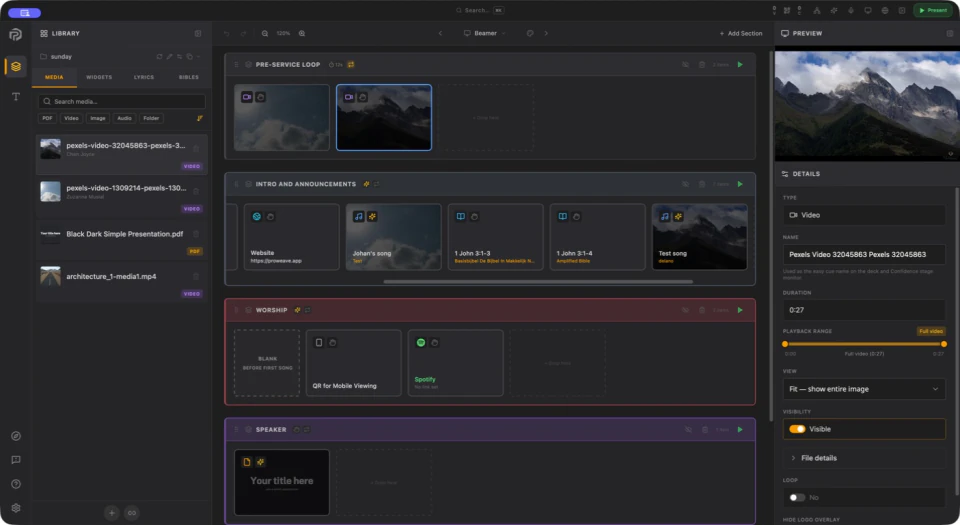
Your existing slides, songs and media together. With controls you can hand over.
Welcome, worship, message: give each part its place. Drag songs and media into order, then reuse the layout.
The service order, live screen and next cue together. Even a new volunteer can see what to do.
A different song or a change of order? Adjust the plan while the current image stays on screen.
Lyrics in the room, notes on stage and a title overlay on your stream. Set up your display profiles once and use them again.
Set up your screensPrepare local songs, Bible passages and media in advance. Once activated, present without internet; online content and cloud services still need a connection.
Prepare your mediaRecognise songs, follow prepared text and give spoken commands. The AI Assistant runs locally, and you can take over at any time.
Explore the AI AssistantImport your existing songs, review them and choose what to keep. Your library stays on your computer.
Import your songsLoad the slides in Presenter and share the Controller QR. Your guest presents from their phone, with no app or account.
Explore RemoteHubPrepare songs and notes together in Hub. Create and review the deck in Presenter. Team also downloads supported attachments for offline use.
Plan together with HubA few practical answers before you begin. Need a hand? We are happy to help.
Contact usYes. Prepared local songs, Bible passages, slides and media remain available without internet. Download and check your files beforehand. Own needs one online activation; Flex and Team refresh their licence every 30 days, with 14 days of grace. Hub, YouTube and other online content need internet.
Read about presenting offlinePresenter is deliberately designed and tested for older hardware. An early-2015 MacBook Pro has been used for the basics: songs, Bible passages and everyday presentations. This does not guarantee every old computer will work. Check the supported operating system and test your own service and displays during the 28-day trial. AI, demanding video and multiple outputs need more processing power.
See downloads and system requirementsYes. For a school gathering, conference or community event, arrange slides, PDFs, images, video and audio in one running order. Give a speaker QR control of the prepared presentation. You do not need to use songs or Bible passages; prepare the items your gathering needs.
See how to build a running orderTry Presenter for 28 days without a payment card, using your own equipment and files. Local Remote and Worship Assist are included. Then choose Own or Flex for Presenter, or Team for Hub with Presenter Flex, unlimited Hub users and 50 GB of shared cloud storage. Flex and Team require an active subscription.
Compare pricing and licencesStart with a familiar song, a Bible passage and a few slides. Put them in order and try it for yourself.